

Skip to main navigation Skip to main content
Return to Homepage 


My Account

Main navigation

  • HOW DO I...
  • JOIN NOW
  • LOCATIONS & HOURS
    • Amelia Givin (Mt. Holly Springs)
    • Bosler (Carlisle)
    • Coy Library (Shippensburg)
    • East Pennsboro (Enola)
    • Fredricksen (Camp Hill)
    • John Graham (Newville)
    • New Cumberland
    • Simpson (Mechanicsburg)
    • System Headquarters
  • EVENTS (opens in new tab)
  • COLLECTIONS
    • Catalog (opens in new tab)
    • Databases
    • eBooks/eAudiobooks
    • Genealogy
    • Law Library
    • New Arrivals
    • Tax Resources
    • Newspapers
    • Online Learning
    • School Tools
  • SERVICES
    • Adult Services
    • Community
    • Computers/Internet
    • Homebound Services (STAR)
    • Job & Career Help
    • Mobile Apps
    • Mobile Printing
    • Notifications
    • Special Services
    • Text Messaging
  • KIDS & TEENS
    • Books & Movies
    • Early Literacy
    • Educator Resources
    • School Tools
    • Skills For Life
  • SUPPORT US
    • Be An Advocate
    • Donate Online
    • How to Donate Items
    • Make A Bequest
    • Volunteer

Tags

Add A Tag

You can add a tag to any item in the Library's catalog. For example, if you are working on a project, you may decide to tag all of the relevant materials to that topic. Or, if you are interested in a hobby, you may want to tag items relevant to the hobby. This social function of the catalog helps you, and others, find materials. In essence, you are helping the Library by adding more keywords to our catalog of items. You can then search the catalog by these terms and refine your materials by tags. 

To tag an item, click on the plus symbol icon under “Additional actions” on the item description page. Choose the tag icon under “more”, then type in the tag and click Submit.
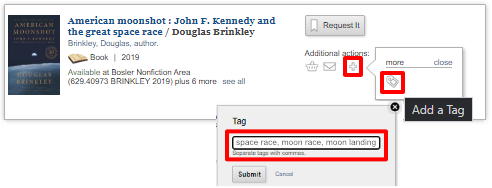
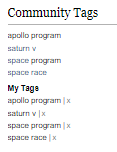
 

Tag example

Community Tags and My Tags

To view all items Tagged with a specific term, click on "Community Tag" after searching for that term

NOTE: To remove the Tag, you must be logged in to your Encore account. From the item description page, find “Community Tags” and your tags will be listed under “My Tags”. Click on the [x] next to your tag to remove it.



Online Catalog
Tags
Subscribe to Tags

ABOUT CCLS

  • Donate
  • Finance
  • Foundation
  • History
  • Intranet (Staff)
  • Mission
  • Organization
  • Policies
  • Search Site

CONTACT US

  • Contact Us
  • Email a Librarian
  • Employment
  • Frequently Asked Questions
  • Request Inter-Library Loan
  • Request Item
  • Search Site
  • Sitemap
  • Volunteer

NEWS & UPDATES

  • Get Advocacy Updates
  • Libraries in the News
  • News Releases
  • NextReads Newsletters

MEMBER LIBRARIES

  • Amelia Givin (Mt. Holly Springs)
  • Bosler (Carlisle)
  • Coy (Shippensburg)
  • East Pennsboro (Enola)
  • Fredricksen (Camp Hill)
  • John Graham (Newville)
  • New Cumberland
  • Simpson (Mechanicsburg)

Cumberland County Library System  | System Headquarters Office, 400 Bent Creek Blvd, Suite 150, Mechanicsburg, PA 17050
Ph: (888) 697-0371, ext. 6175 or (717) 240-6175 | Web Site by Cumberland County Library System (Mechanicsburg, PA)
Accessibility | Site Notices | Contact Webmaster
POWER Library icon PA Forward

Copyright © 2026 Cumberland County Library System - All rights reserved

Theme Developed & Designed by Alaa Haddad - Site Developed by David MacLachlan Cumberland County Library System